


How to Install and Run the downloaded BOT file (EA) in MetaTrader 4
Step 1:
Download and unzip your EA archive
Open your EA folder. In this folder there will be all files that are required for your Expert Advisor to work.
Usually, simple EAs consist of two files with the following extensions:
.mq4 – your EA source code, which can be viewed in MetaEditor. Used for making any adjustments/updates in your EA code.
EAs that are more sophisticated may contain additional files that are required for correct work of the EA.
Step 2:
Copy your EA files into your MT4 terminal
All files required for the working process of your Expert Advisor in MetaTrader 4 should be located in the Data Folder of your MT4 terminal.
To do this:
Launch your MetaTrader 4
Click File in the upper navigation menu -> select Open Data Folder
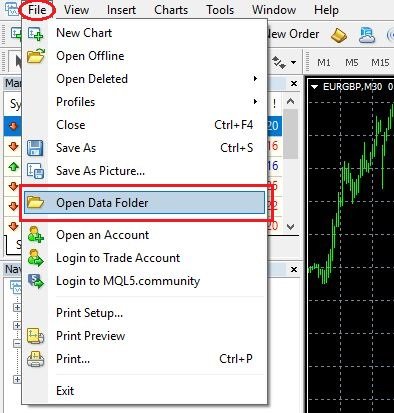
The Data Folder with your MT4 terminal will be opened
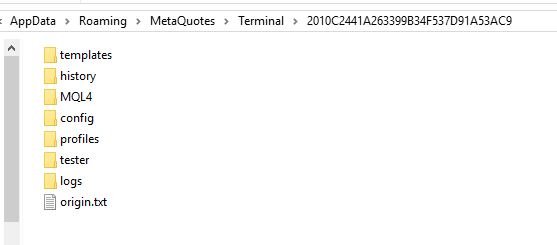
In the just opened Data Folder, open MQL4 -> Experts. This is the folder in which you need to copy your EA files. If your EA consists of two files (.ex4 and .mq4), just copy and paste them into the Experts folder. If your EA consists of several files, copy and paste the unzipped folder from Step 1 into the Experts folder.
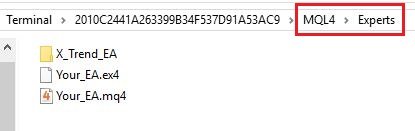
Please note that if your EA is based on some custom indicators they should be located in a separate folder MQL4 -> Indicators. Files with .dll extension should be located in MQL4 -> Libraries folder. After your copy all the files into related folders, restart your MT4 terminal or open “Navigator” in your MetaTrader 4, right-click on “Expert Advisors” point of menu and click “Refresh”.
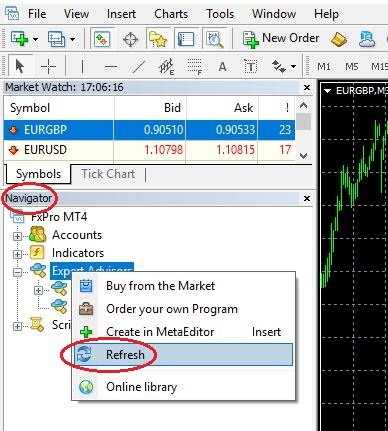
Now your EA is successfully installed in your MT4 terminal and is available in “Navigator” window under “Expert Advisors” menu.
Step 3: Check your EA settings before the start
In the upper navigation menu click “Tools” -> select Options
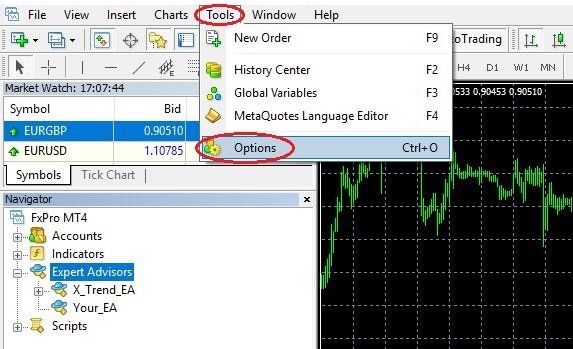
In the opened window open “Expert Advisors” tab and check if:
“Allow automated trading” is enabled
“Allow DLL imports” is enabled in case your EA uses .dll files
If your EA is designed for some specific financial asset or time-frame, for security reasons set “Disable automated trading when the charts symbol or period has been changed”